Email sequences that know when to stop
Sequencer sends your outreach from your own mailboxes, one polite email at a time. When someone replies, it stops. Then it shows you which emails, words and send times earned the answers.
Every screen on this page shows sample data from a made-up outreach campaign. No real people are in it.
It sends like a person
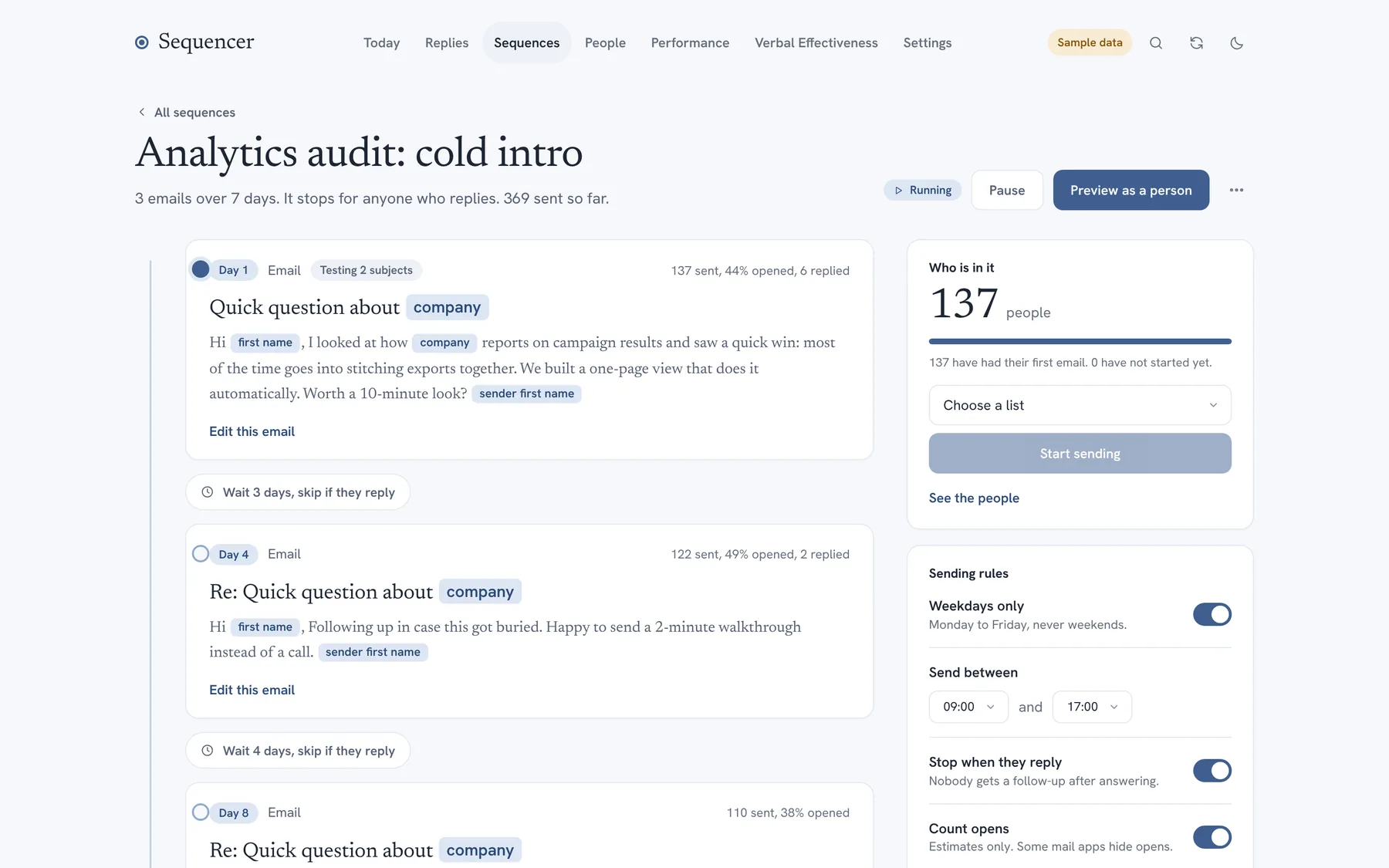
One email at a time from each mailbox, random gaps, your sending hours, weekdays only. Nothing goes out with a blank where a name should be.
It stops when it should
A reply, a bounce or an unsubscribe ends the sequence for that person. So does a STOP request, which also puts them on your suppression list.
It tells you why
Open rate, reply rate, the words that go with each, and one health score that says what to fix first.
See the whole sequence on one line
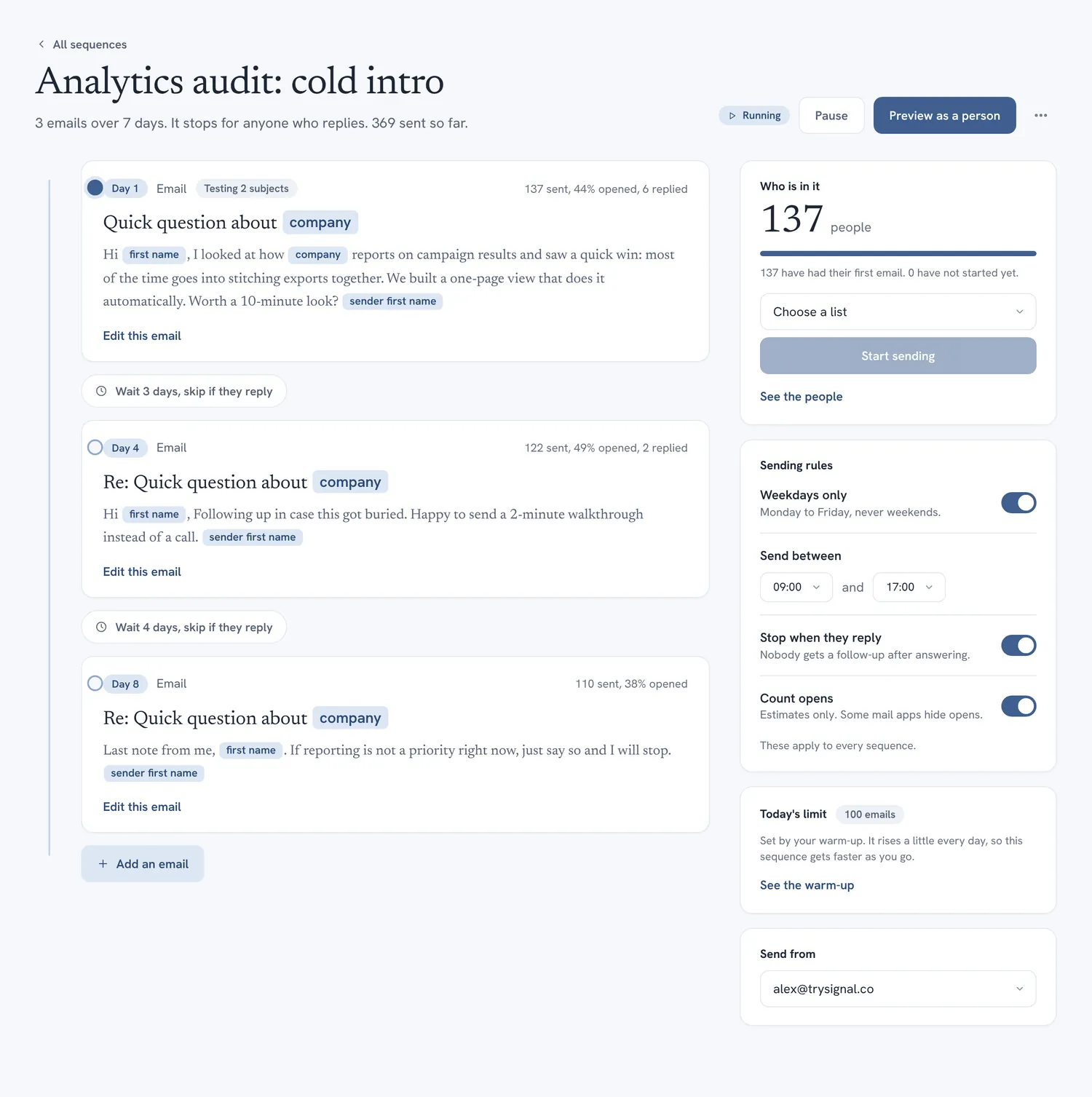
A sequence is a timeline: the first email, the wait, the follow-up, the wait, the last nudge. Under each step you see how many people are there and how that email is doing.
- Waits are in days, so the plan reads the way you would say it.
- Follow-ups stay in the same thread as the first email.
- Test two subject lines against each other and see when the difference is real.
- Start from a list. People you add to the list later join on their own.
Write the email and see it as it will arrive
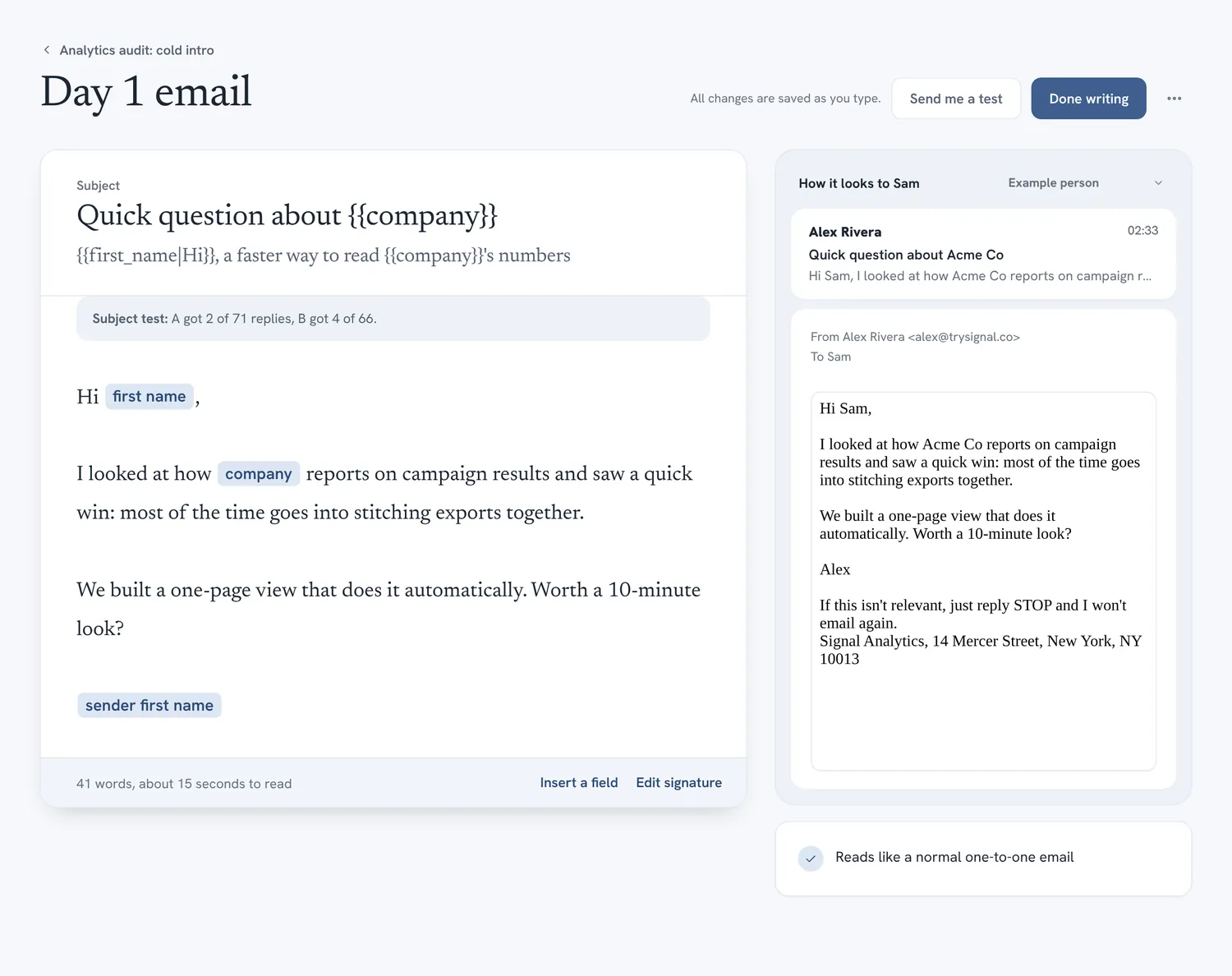
The builder puts your text on one side and the finished email on the other. You see the real subject, the merged-in name and the footer before anything is sent.
- Merge fields have fallbacks, such as {{first_name|there}}.
- If a field is empty and has no fallback, the email is held back instead of going out as “Hi ,”.
- A copy checker flags the wording that tends to land in spam.
- Plain text is the default. A designed look is optional.
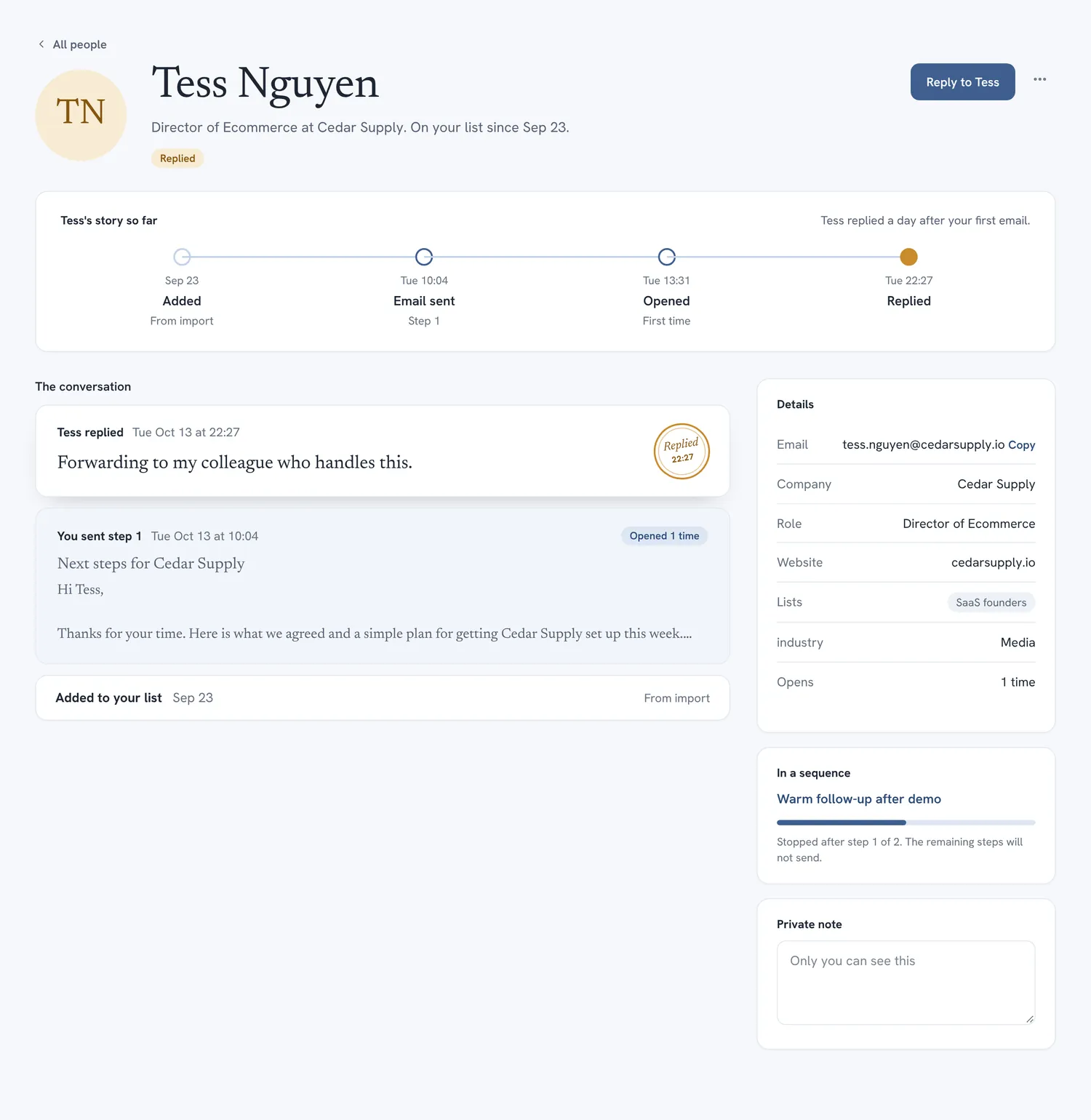
Every person has a page, and it tells the story
Open anyone and read what happened in order: which emails they got, whether they opened them, whether they answered, and where they stand now.
- Import a spreadsheet into a list, or add people one by one.
- A suppression list that stays even if you delete the contact.
- Jump from a person to the sequence they are in, and back.
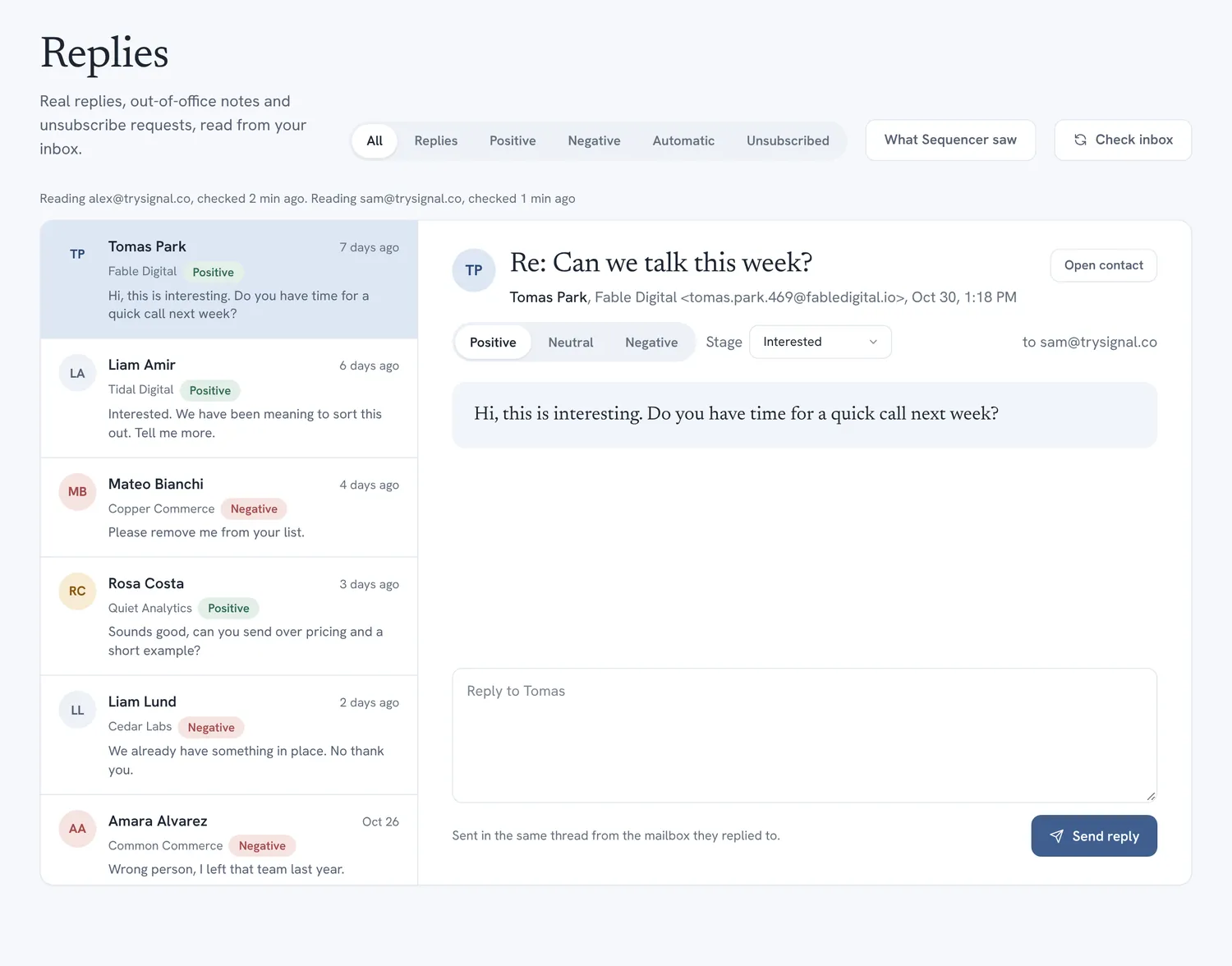
Replies come to you, sorted
Sequencer reads your inbox and works out what each message is. A real reply stops the sequence and moves the person forward. Bounces, unsubscribes and out-of-office notes are told apart.
- Hard, soft and blocked bounces are separated. A hard bounce suppresses the address.
- Out-of-office notes are logged and do not stop the sequence.
- A page shows every message it read and what it did with it, so nothing is a mystery.
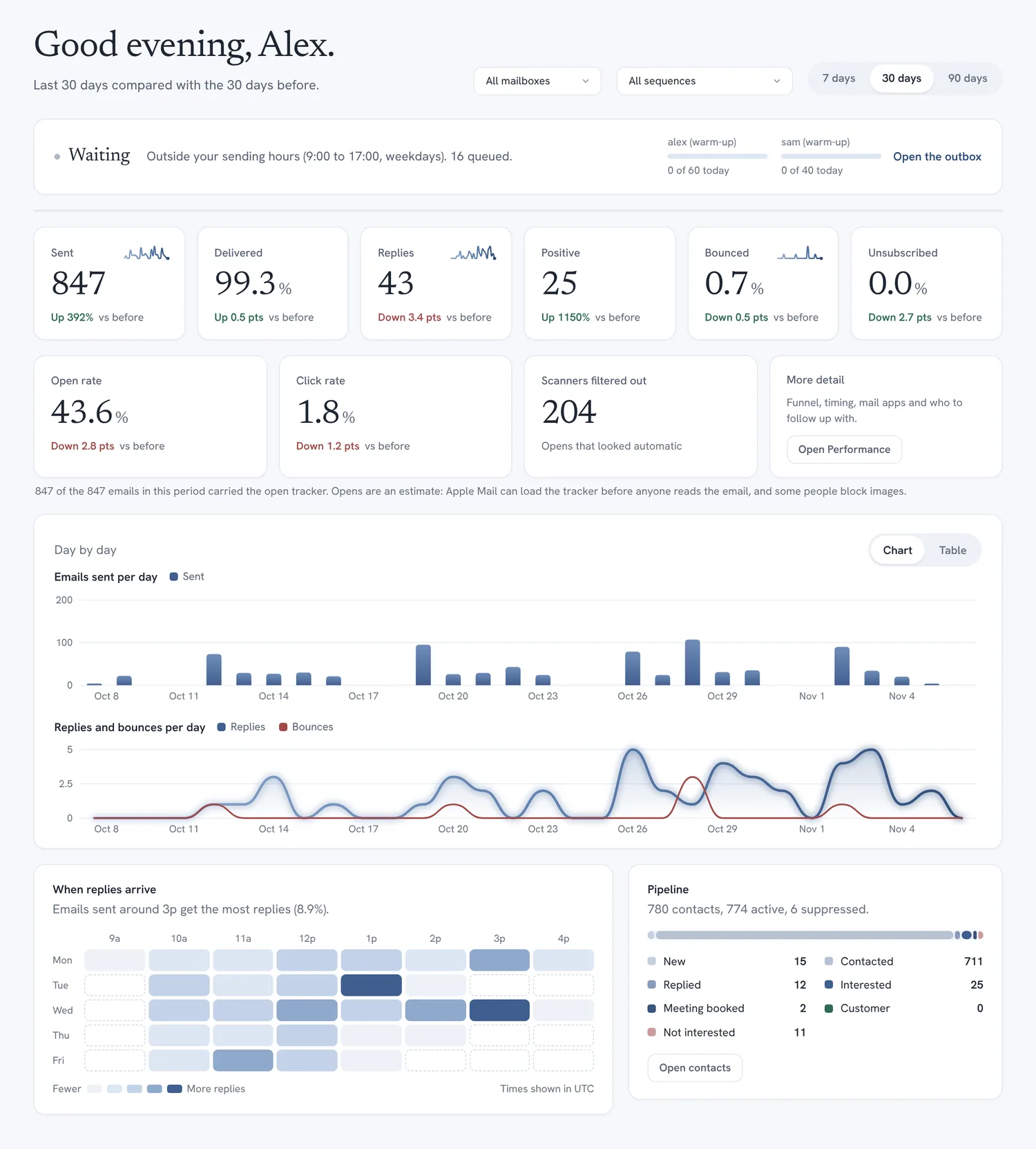
Start the day with what needs you
The overview shows what is going out, what came back, and what is wrong. It is the page you open first and rarely need to leave.
- A live strip showing who goes out next, how many are queued, and how much of each mailbox’s daily limit is used.
- Alerts that name a problem and link to where you fix it.
- Key figures and daily charts, each compared with the period before.
- Press Cmd K on a Mac (Ctrl K elsewhere) to jump to any page or person.
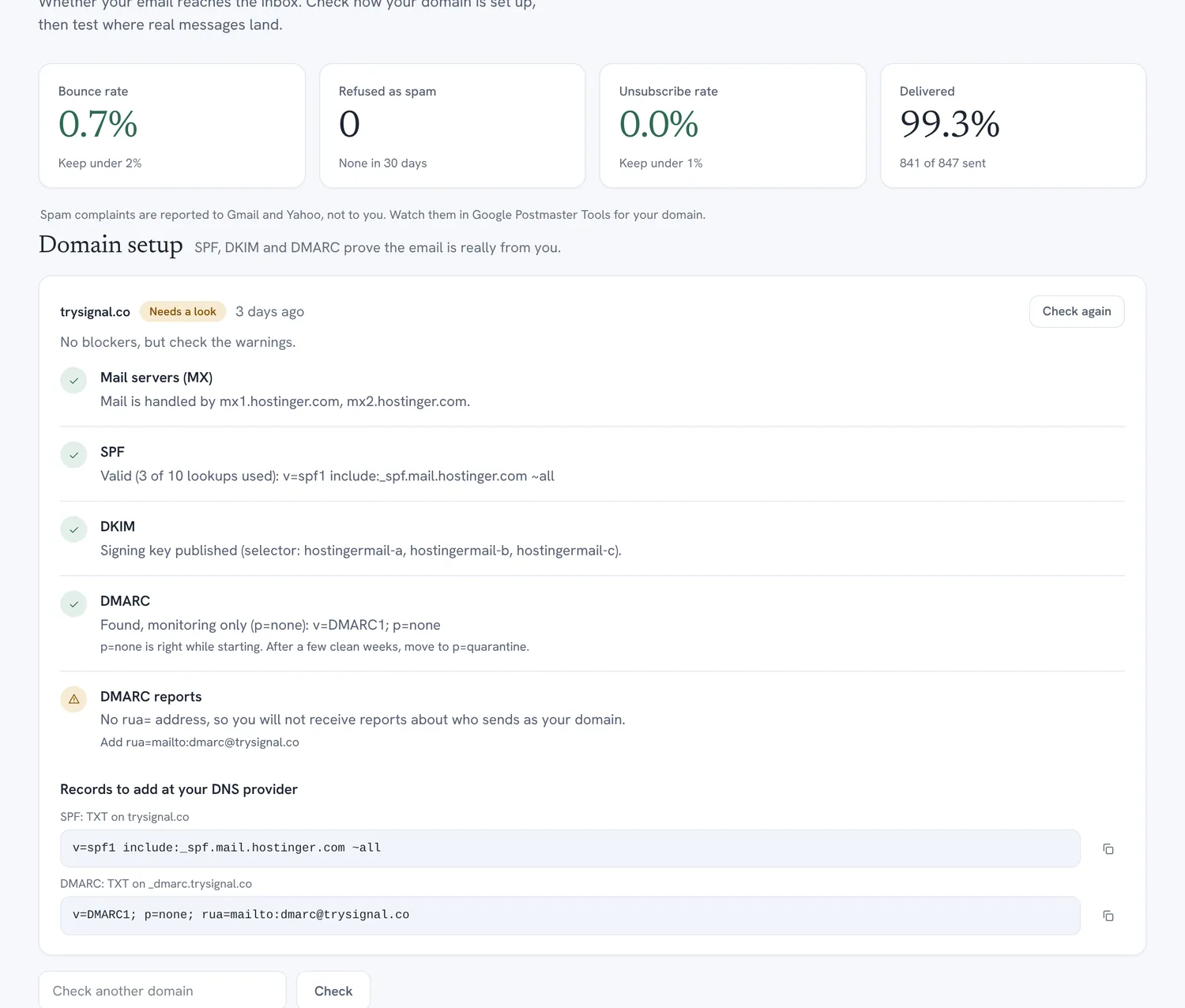
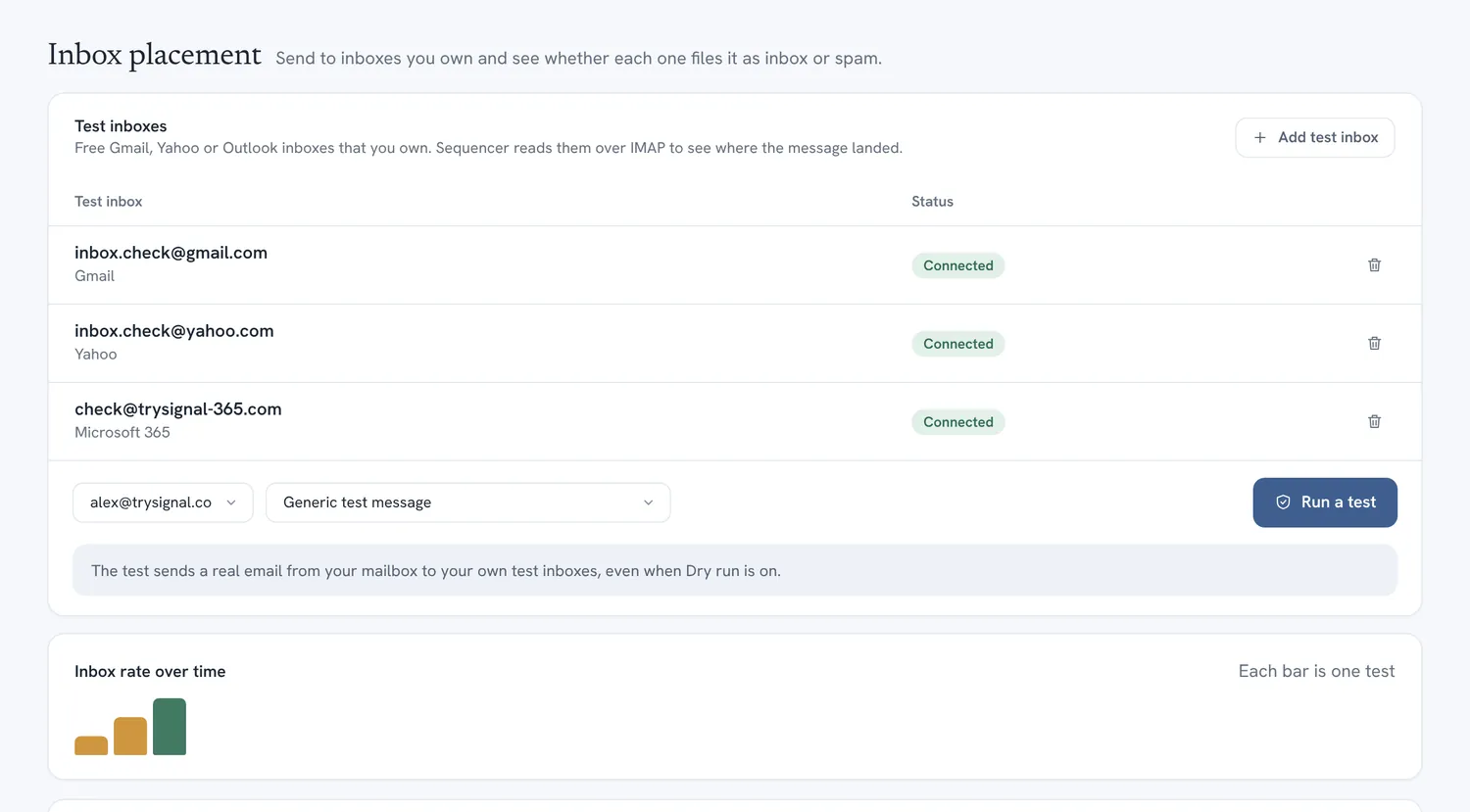
Check that mail can reach the inbox before you send
Most cold email problems are set-up problems. Sequencer checks your domain’s records, reads the headers of a real message, and sends test emails to inboxes you own to see where they land.
- DNS checks for SPF, DKIM and DMARC, in plain language.
- A header analyzer that shows what a receiving server saw.
- Placement tests: inbox, promotions or spam, per provider.
- Warm-up and daily limits for new mailboxes.
These checks reduce risk. No tool can promise where a message will land, and Sequencer does not.
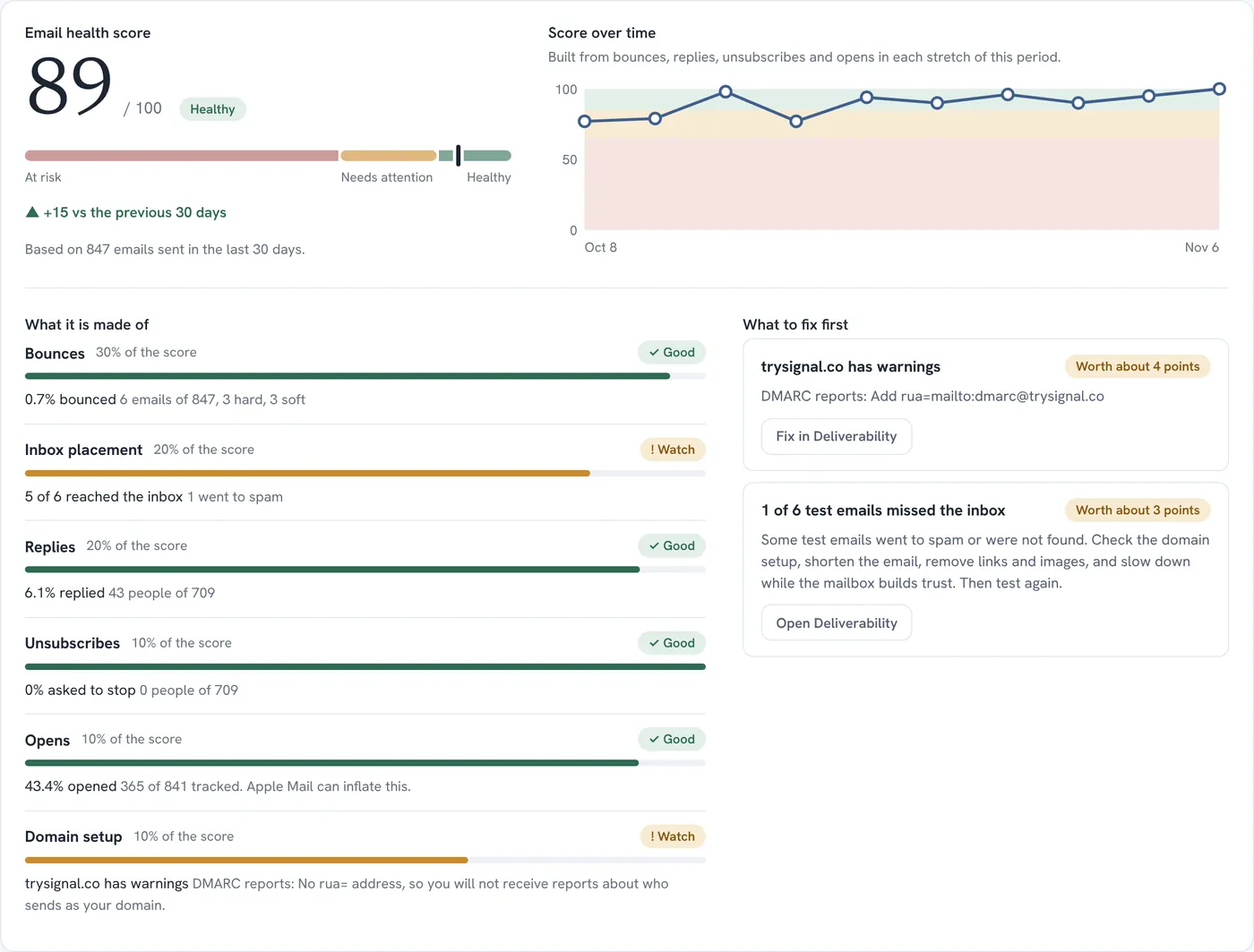
One score for how healthy your sending is
The email health score runs from 0 to 100 and sits at the top of Analytics. It follows the period and the sequence you pick, so you can look at last week, or at one campaign.
- It shows its parts and how much each one counts.
- It compares with the previous period and draws the trend.
- A “fix first” list names the one or two things that would move it most.
- If something cannot be measured, such as opens with tracking off, it leaves that part out instead of guessing.
- With fewer than 20 emails in the period it shows no score at all.
Analytics that answer a question
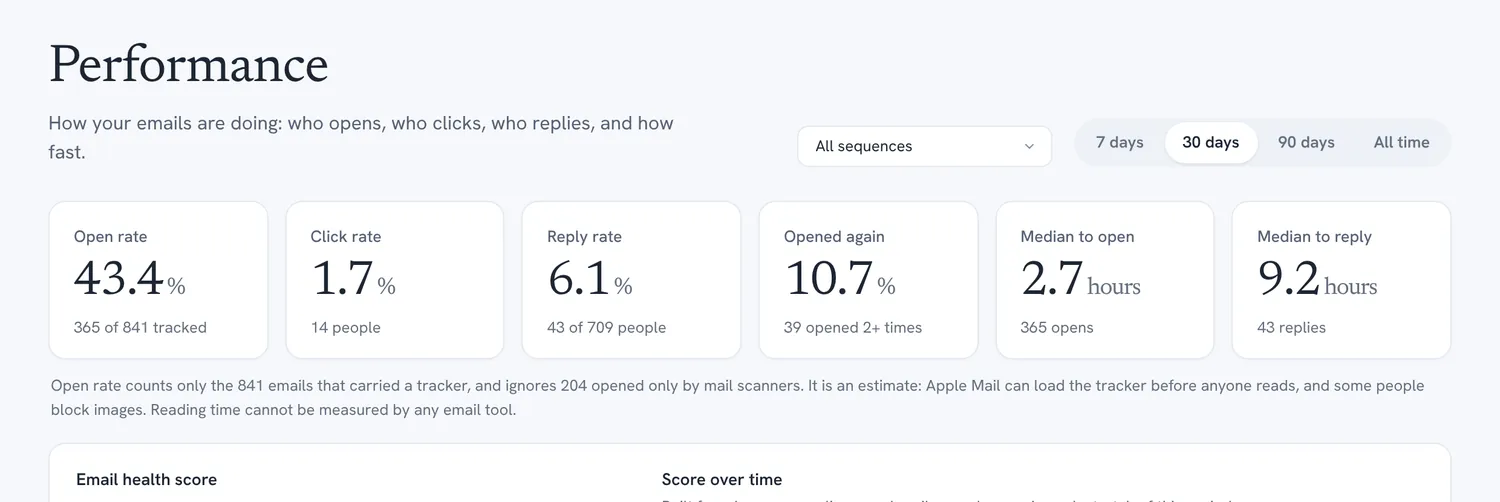
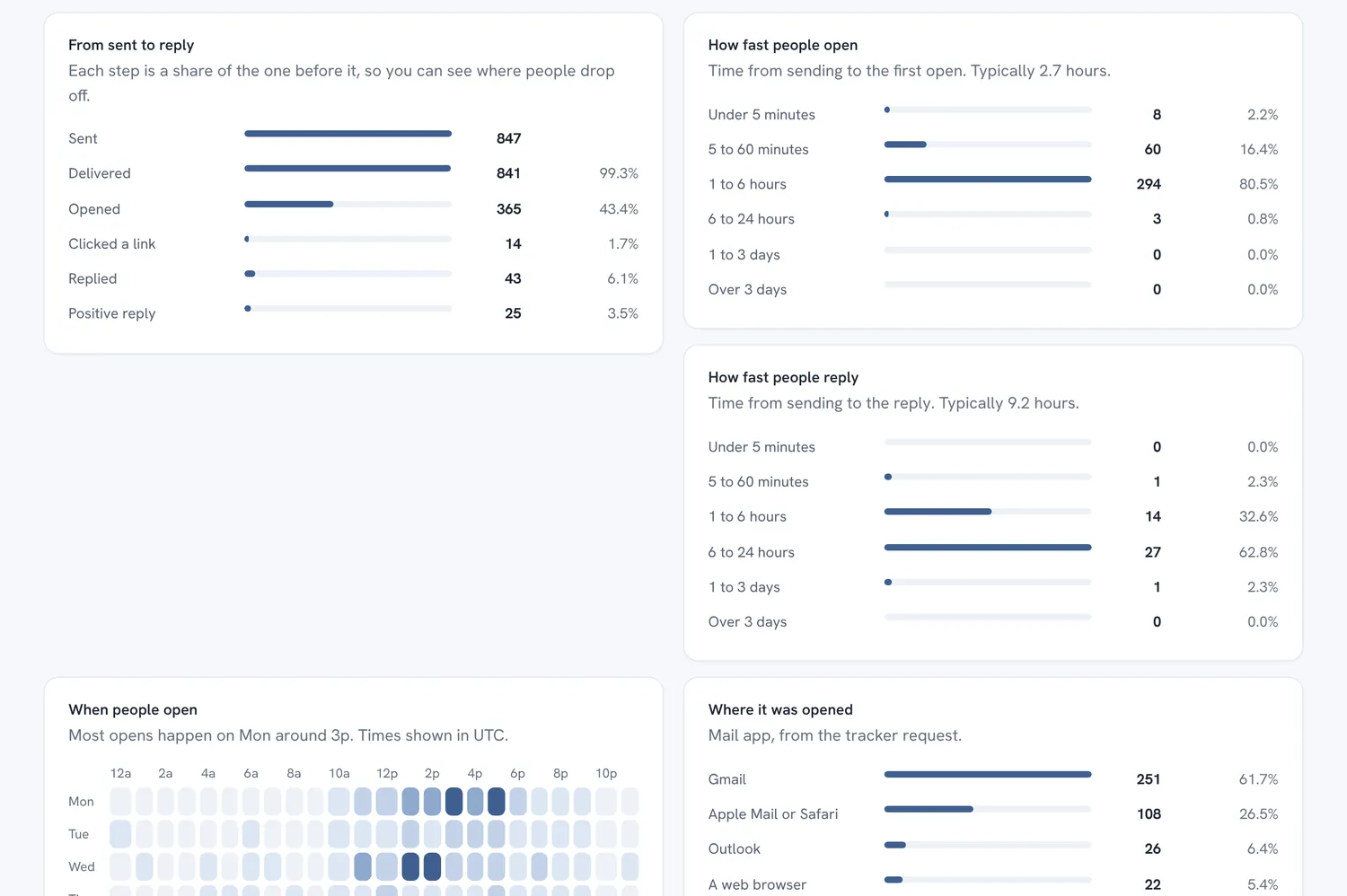
Compare this period with the last. See the funnel from sent to replied, the hours when people open, the best hour to send, and which people opened three times and have not written back.
- Results by sequence, step, subject line, mailbox and recipient domain.
- Open rate counts only emails that carried the tracker, with mail scanners filtered out.
- Opens are an estimate. Apple Mail can load the tracker before anyone reads. Replies are the number to trust, and the page says so.
Which words go with opens and replies
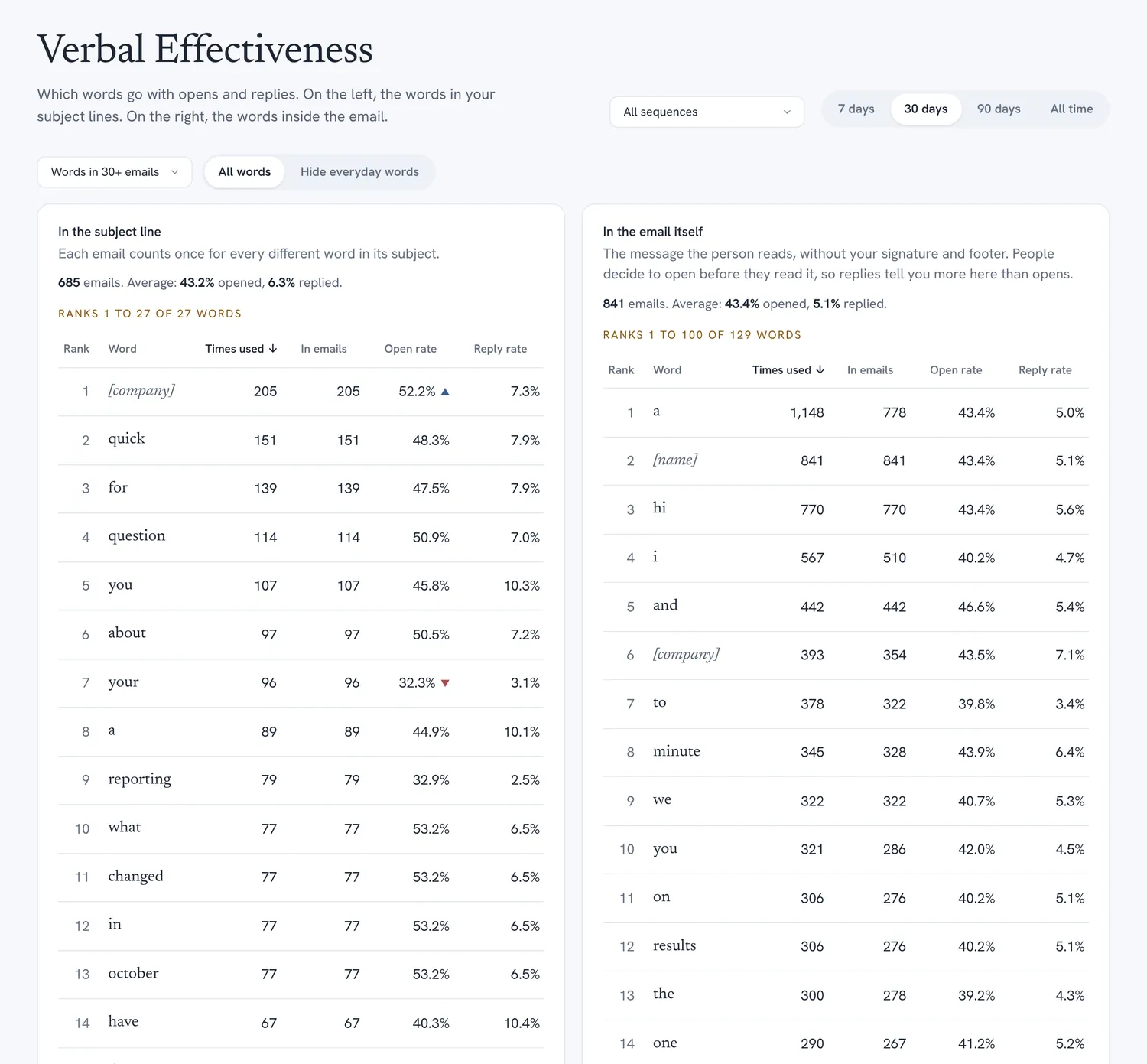
Verbal Effectiveness ranks the words you use like a word-frequency table. Subject-line words are on the left and the words inside the email are on the right. Each word shows how often you used it, in how many emails, and its open and reply rate.
- Sort by any column.
- Names and company names are folded together, so “Anna” and “Marcus” count as one placeholder.
- A ▲ or ▼ appears only when a word is clearly above or below your average for the number of emails it comes from.
It is a hint, not proof. Words that always travel together cannot be told apart, so test two versions before you decide.
A sample month of outreach
What the screens above add up to: 780 people, two mailboxes, thirty days.
Sample data created for this page. Your numbers will differ.
Bring the mailbox you already use
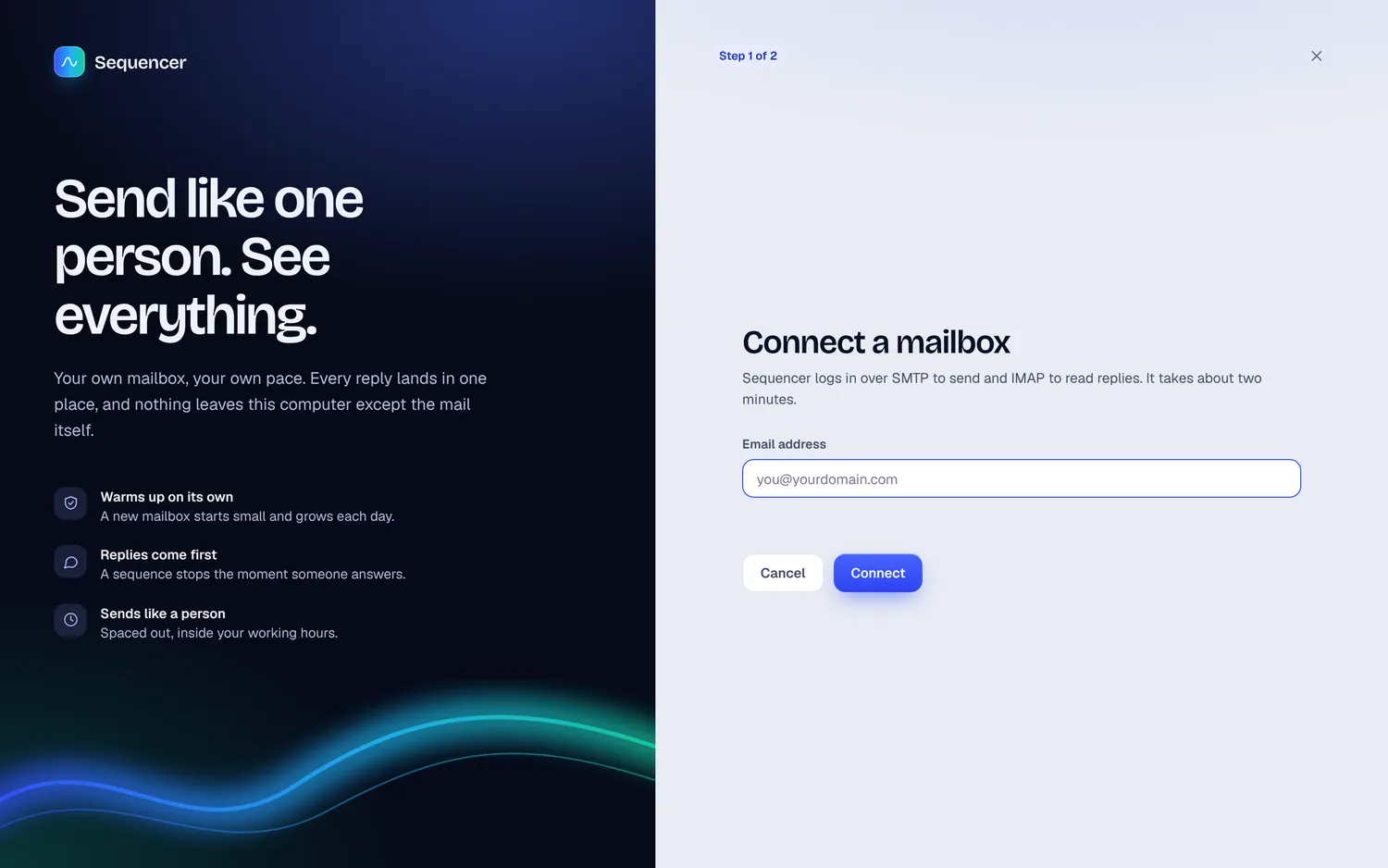
Sequencer sends through your own mailbox, so mail comes from a real address on your domain. Connect it once with an app password or a token, and send yourself a test.
- Proton Mail (custom domain, with Bridge)
- Google Workspace and Gmail
- Microsoft 365
- Hostinger
- Namecheap
- Zoho
- Fastmail
- GoDaddy
- IONOS
- iCloud
- Any SMTP and IMAP server
- Mailbox passwords are stored encrypted on your computer.
- Sequencer runs on your Mac. Contacts, emails and results stay in a database on your own disk.
- Open tracking is off until you turn it on, and it has a guided setup with a button that tests the address.
From first login to first reply
Four steps, in this order, so the first real email is not the first test.
Connect a mailbox
Pick your provider, enter the details, and send yourself a test. The test shows you the email as a recipient sees it.
Check your domain
Run the domain checks and a placement test. Fix what it flags before you write a word.
Add people and write the sequence
Import a list, write the first email and the follow-ups, and set the waits between them.
Start sending, then read what comes back
Sequencer paces the sends, finds the replies where it can read them, and stops for anyone who answers. The health score and the word tables fill in as you go.
And the details that save you a bad day
Small things that are easy to get wrong when email is done by hand.
- No double sends
- Each email is claimed before it goes out, so the same step cannot be sent twice, even if you press Send now just as the timer fires.
- One-off campaigns
- Send a single email to a list now, or schedule it for later.
- Sending hours and weekdays
- Mail goes out when you say, in your time zone, with a daily limit per mailbox.
- Unconfirmed sends are held
- If the mail server took a message but never confirmed it, Sequencer does not resend by itself. It asks you to look first.
- An unsubscribe line that works
- The opt-out line stays in every email. A person who asks to stop is suppressed.
- Backups
- Download a copy of the whole database from Settings whenever you like.
- Light and dark
- The app follows your Mac’s setting, and a button switches it.
- Suppression that lasts
- Hard bounces and unsubscribes go on a list that survives deleting the contact, so nobody is emailed again by accident.
Questions
Where does my data live?
On your own computer. Sequencer keeps one database file and one key file in your Mac’s Application Support folder. Nothing is uploaded to Analyticure.
Does it need a Mac?
It is built and tested on macOS. It is a Node.js app with a local database, so it may run elsewhere, but Mac is what we support.
Does it work with a Proton Mail custom domain?
Yes. Sequencer sends with a Proton SMTP token, or through Proton Bridge. To read replies it uses Bridge, or an inbox you forward Proton mail to. A mailbox that only sends cannot see replies, and Sequencer tells you so.
Will my emails reach the inbox?
Nobody can promise that. Sequencer checks your domain, tests where real messages land, paces sending and warms new mailboxes, which lowers the risk. The health score tells you how it is going.
How accurate are open rates?
They are an estimate. Apple Mail can load the tracking image before anyone reads the email, some people block images, and Gmail keeps one copy. Reply rate is the dependable number, and Sequencer gives it equal weight on every page.
Can it measure how long someone read an email?
No, and no email tool can. A tracker only learns that an image was loaded, so Sequencer does not show reading time.
Can I sign up?
Not yet. Sign-in is open to people we have set up. To ask for access or a walkthrough, write to contact@analyticure.com.
Want to see it with your own mailbox?
Tell us what you send and to whom, and we will reply with a walkthrough.